The command is accessible through.
Components output to drawing -> Assembly->Arrangement of Views
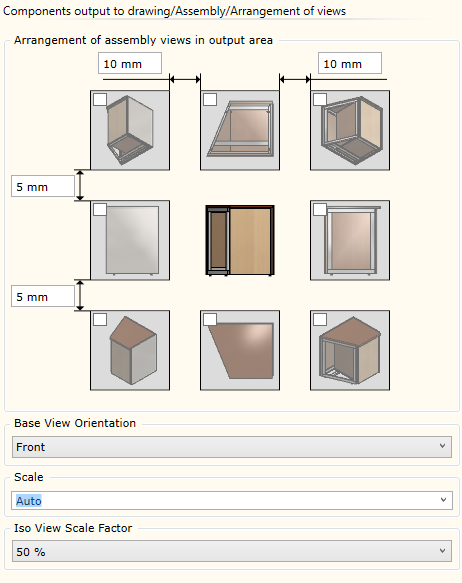
▪In the Arrangement of assembly views in output area panel, it is specified which projections should be used when displaying an Assembly-type component in a drawing. When the cursor is held over a projection display box for a longer time, options appear that allow selecting projection display variants:
|
Wireframe display. |
Wireframe display with Hidden lines removed. |
|
Projection view Rendered in furniture colours. |

▪Base View Orientation - allows specifying how the Assembly component should be oriented in the main (Center) projection The orientation is defined relative to the Assembly (View Cube).
▪Scale - allows selecting the scale at which the Assembly should be displayed. The "Auto" option always recalculates the projection scales so that they fit into the output area. Otherwise, when a specific scale is selected, only the starting point coordinates from the output area settings are used. In such a case, the size of the area is not considered.
▪Iso View Scale Factor - allows setting the scale factor for the isometric projection. The scale factor is taken from the main projection scale.